
Mia World - Makeover Life
31 Dress up GamesEducational
3.6573.00 Reviews
- Version
- 1.5.4
- Installs
- 10.00M
- Age Rating
- Everyone
Screenshots
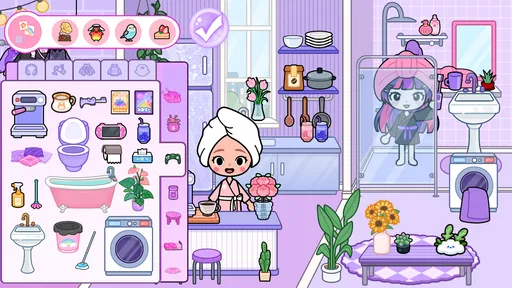
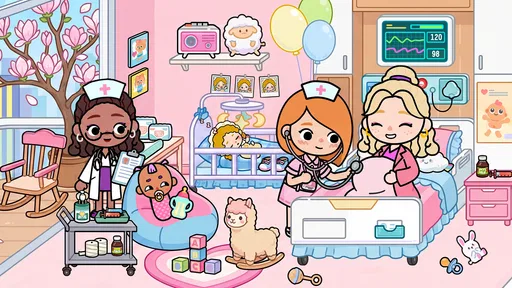
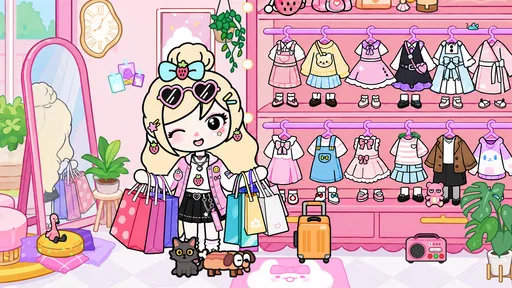
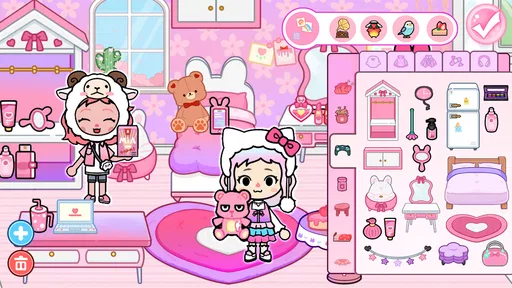
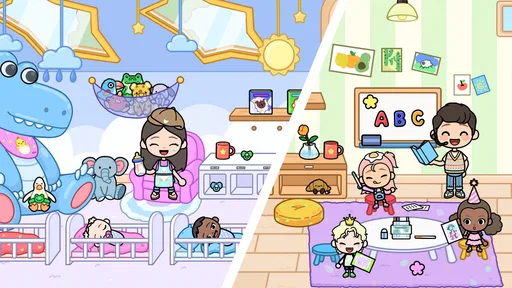



Our Review of Mia World - Makeover Life
 Analysis by Appyee
I usually know within a few sessions whether a dress-up game is only a quick distraction or something I’ll want to revisit. Mia World - Makeover Life makes a lively first impression because it brings character styling and room decoration together. Instead of choosing an outfit and stopping there, I can move between a character’s look and the space around them, which gives the creative play a little more context.
That combination is the main reason I’d try it with a child who enjoys make-believe, or with anyone who likes arranging colors and details without needing a complicated rulebook. It is an educational game from 31 Dress up Games, though I’d approach “educational” in a broad, informal sense: the appeal is creative choice and visual experimentation, not a structured lesson. The game is free to download, rated for Everyone, and has optional in-app purchases, so I’d keep that distinction in mind if a younger player will use it.
Why the first sessions feel inviting
The first thing that hit me was the app's welcoming interface. It's colorful and inviting, perfect for the kind of playful exploration Mia World - Makeover Life promises. Right from the get-go, you're thrown into a world where you can transform not only characters but entire rooms. It's like having a makeover show right at your fingertips.
As I started playing, I was impressed by the variety of choices available. Whether it's changing hairstyles, picking outfits, or redecorating living spaces, the options are endless. The app does a fantastic job of making you feel like every decision is vital, which is both exciting and a tad overwhelming—like walking into a closet full of endless possibilities.
That abundance is fun at first, but I find it helps to give each session a small theme. For example, I might decide to coordinate a character’s appearance with the mood I want for a room, rather than trying to adjust every available detail at once. This turns open-ended browsing into a manageable mini-project and makes it easier to feel satisfied when I stop. It is also a useful way to see whether the game’s creative loop suits you: if choosing and comparing visual details is the enjoyable part, the freedom is a strength; if you would rather have a clear win condition, it can feel diffuse.
Styling and decorating as a hands-on loop
Diving deeper, the customization features are where the app truly shines. You can mix and match styles, colors, and designs with just a few taps. I found myself getting lost in the details, adjusting shades of lipstick or the pattern on a throw pillow. It’s a game where your creativity can run wild, and trust me, it's super satisfying to see your vision come to life.
What’s more, the game doesn’t skimp on quality. The graphics are crisp, and the animations are smooth, which makes the experience all the more immersive. It’s like playing with digital dolls, but with a modern twist that keeps you coming back for more.
The character-and-room pairing also gives me a practical way to avoid random choices: I can pick one visual anchor first, such as a color or a particular style, then build the rest of the look around it. If the result feels mismatched, I can change one element at a time instead of starting over mentally. That small habit makes the customization feel less overwhelming, especially for players who enjoy design but can get stuck when every option is open at once.
Compared with a dress-up game focused only on outfits, this one offers a broader canvas because decorating is part of the appeal too. Compared with a dedicated interior-design game, the character styling makes the experience feel more playful and less like a room-planning exercise. That middle ground is its identity, but it also means players seeking deep, technical design tools or a tightly guided story may prefer a more specialized alternative.
What keeps the game worth revisiting
I’d judge its staying power by whether I can give each return visit a fresh, small purpose, rather than expecting the game to supply endless novelty. A simple theme—matching a character’s look to a room’s mood, for instance—can make familiar choices feel intentional, while a task can help when I want a nudge. That balance between self-directed play and gentle structure is what I’d consider before deciding whether it belongs in my regular rotation.
Goals, pacing, and small-session play
Now, what's a game without a bit of challenge, right? The app has this covered with its series of tasks and goals. Completing these gives you rewards that you can use to unlock even more fabulous items. It's a clever way to keep you engaged, as you’re always working towards the next big thing, whether it’s a new outfit or a chic piece of furniture.
But don’t worry, if you’re like me and love a leisurely experience, you can still enjoy the game without feeling rushed. It’s all about finding the balance that suits your play style.
In an everyday routine, I can see this working as a short break after school or during a quiet stretch at home: open the game, make progress on a task, and leave the next styling idea for another time. The goals give a session a starting point when I do not feel like inventing a theme from scratch. On a different day, I can ignore that nudge and simply experiment. That flexibility is more useful than a constant stream of demands, particularly for a casual game meant to fit around other activities.
For ongoing value, I would judge it less by how many items I can collect and more by whether I still enjoy making fresh combinations after the initial novelty fades. A simple personal challenge can help: try a contrasting palette, build a room around one chosen color, or make the character and setting feel as though they belong in the same little story. These are self-imposed prompts rather than special modes, but they give familiar choices a new purpose without turning the game into homework.
Where repetition and spending can change the mood
The main long-term risk is that a creative loop can start to feel repetitive once I have tried the combinations that immediately appeal to me. Tasks and unlockable items provide direction, but they do not automatically make every return session feel fresh. If I need new objectives, a strong narrative, or competitive play to stay interested, I would probably lose momentum here. I would also skip it if my priority were a serious design simulator rather than relaxed character-and-room makeovers.
There is a practical consideration for families, too. Optional purchases range from $0.99 to $4.99 per item, so I would check purchase settings before handing the device to a child and agree on expectations in advance. The game itself is free, but “free to start” is not the same as “nothing to consider”; a player who wants every available item may encounter a different experience from someone content to work with what is accessible through play.
Its audience figures suggest that many people have tried it: it has over 10 million installs, around 29,000 ratings, and a 3.7 average. Those numbers are only context, not a guarantee that it will fit your taste. The current version is 1.4.6, it was released on July 17, 2024, and it requires Android 6.0 or later. I’d treat those compatibility details as a quick device check before installing rather than as a reason to expect any particular performance on every phone.
One more useful way to approach it is to decide what a satisfying session means before opening it. If I want to unwind, I can make one small change and stop; if I want a creative activity, I can coordinate a character and a room around a theme. That prevents the open choice from turning into aimless tapping. It also makes the game easier to share casually: one person can suggest a mood or color, while the player makes the actual styling decisions, without needing a score or a contest to make the activity enjoyable.
My lasting-use verdict
So, would I recommend it? Absolutely—to the right person. It’s a delightful mix of creativity and gameplay that offers a little something for everyone. Whether you're looking to pass the time, explore your creative side, or just have some fun, this app hits the spot. Give it a whirl, and you might just find yourself hooked on the makeover life!
My more measured recommendation is for players who like low-pressure visual play and enjoy switching between fashion choices and room details. It is especially easy to picture as a shared, informal activity with a child, provided an adult handles purchase expectations. I would not choose it for someone who wants a structured course, demanding strategy, or endless novelty supplied by a deep story. Its best lasting habit is modest: return when you feel like making something, use a task when you want direction, and stop when the choices begin to blur together.
That balance is what decides whether it earns space on my device. The game has enough variety in its two creative areas to make early sessions appealing, and its goals offer a reason to come back, but the long-term enjoyment still depends on liking repetition with room for personal ideas. If that sounds relaxing rather than limiting, it is worth trying; if you need each session to introduce a new system or challenge, I’d look elsewhere.
Privacy and Permissions
See what permissions an app requests and how it handles your data.
- Photos/Media/Files
- read the contents of your USB storage, modify or delete the contents of your USB storage
- Storage
- read the contents of your USB storage, modify or delete the contents of your USB storage
- Other
- view network connections, full network access, control vibration, prevent device from sleeping
Verdict
Strengths of Mia World - Makeover Life
- Intuitive interface for easy navigation.
- Vast wardrobe selection for customization.
- Engaging storyline with interactive elements.
- Regular updates with new content.
- Great graphics enhance user experience.
Limitations of Mia World - Makeover Life
- In-app purchases can be expensive.
- Occasional ads interrupt gameplay.
- Requires constant internet connection.
- Some features need improvement.
- Limited character customization options.
Similar Picks in This Category
View All
Little Panda Policeman
BabyBus4.0

Monster Trucks Game for Kids 2
Raz Games4.1

Little Panda's Chinese Recipes
BabyBus4.4

Little Panda's Restaurant
BabyBus4.4

Little Panda's Ice Cream Games
BabyBus4.3

Baby Panda Care
BabyBus3.8
Frequently Asked Questions
What is Mia World - Makeover Life about?
Mia World - Makeover Life is an interactive simulation game where players can explore the exciting world of fashion and design. In this game, you can give characters stunning makeovers, design outfits, and unlock various fashion items. The game offers a vibrant and creative experience, perfect for fashion enthusiasts.
Is Mia World - Makeover Life free to play?
Mia World - Makeover Life is free to download and play, but it includes in-app purchases. These purchases allow players to unlock additional content and features, such as exclusive outfits and accessories. While the game can be enjoyed without spending money, these purchases can enhance the gaming experience.
What platforms can I play Mia World - Makeover Life on?
Mia World - Makeover Life is available for both Android and iOS platforms. You can download it from the Google Play Store or the Apple App Store, making it accessible to a wide range of mobile users. Ensure your device is compatible and has enough storage for a seamless experience.
Does Mia World - Makeover Life require an internet connection?
Mia World - Makeover Life primarily requires an internet connection for downloading updates and accessing certain features. However, some gameplay aspects can be enjoyed offline. For the best experience, especially when participating in events or competitions, a stable internet connection is recommended.
Are there any age restrictions for playing Mia World - Makeover Life?
Mia World - Makeover Life is generally suitable for players aged 12 and up, as it involves interactive gameplay and in-app purchases. Parents may want to supervise younger players to ensure they understand in-app purchase options and stay safe while engaging with other online features.
Play our best games!


